


Magnetic Wireless Mouse
Magnetic Wireless Mouse
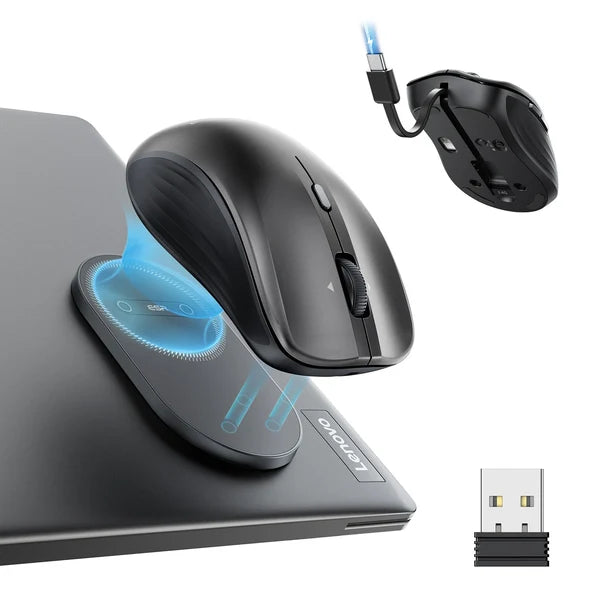
🧲 Magnetic laptop attachment
🔗 Bluetooth and 2.4 GHz connectivity
↔️ Four-way scrolling


NEW RELEASE | LOW STOCK
BUNDLE & SAVE
Couldn't load pickup availability
-

The magnetic attachment is handy when I move between my desk and meeting rooms.
-

Horizontal scrolling makes working in spreadsheets much easier.
-

I like having the charging cable built into the mouse.


How It Works

How It Works
Attach the magnetic base to a suitable flat surface on your laptop, then connect the mouse through Bluetooth or the 2.4 GHz receiver. When it’s time to leave, place the mouse on the base so it travels with your laptop.
Our Guarantee

Our Guarantee
Try it with confidence. If you’re not satisfied, contact us within 30 days for a money-back refund—no questions asked.
Shipping

Shipping
All orders get fulfilled within 1-2 business days and shipped within 5-10 business days

Magnetic Wireless Mouse



Magnetic Wireless Mouse - Luxtony
Your Mouse, Right Where You Need It
Move between meetings, workspaces, and coffee shops without digging through your bag for a mouse. The magnetic attachment keeps it close to your laptop, so your setup is ready when you are.

Magnetic Wireless Mouse - Luxtony
Easy to Carry
Attach the mouse to its magnetic base before you head out. It stays together with your laptop for a tidier commute.

Magnetic Wireless Mouse - Luxtony
Scroll with Less Effort
Move up, down, left, and right with the four-way wheel. It’s especially handy for wide spreadsheets and documents.

Magnetic Wireless Mouse - Luxtony
Made for the Way You Work
A quiet-click design, adjustable sensitivity, and a built-in charging cable bring everyday convenience into one compact mouse. From desk work to travel days, it’s designed to make your setup easier to carry and use.
WE ASKED OUR CUSTOMERS AND FOUND OUT...
95%
said the magnetic attachment made their mouse easier to carry with their laptop.
97%
found the four-way scroll wheel helpful when working with spreadsheets.
93%
liked having both Bluetooth and 2.4 GHz connection options.
Have Questions? We have Answer!
How does the mouse attach to my laptop?
How does the mouse attach to my laptop?
Place the magnetic base on a suitable flat area of your laptop, then set the mouse onto the base. Check that the surface is clean and that the placement doesn’t block ports or ventilation.
How does it connect to my device?
How does it connect to my device?
The product images show Bluetooth and 2.4 GHz wireless connection options. Select the mode supported by your device.
Can I change the cursor speed?
Can I change the cursor speed?
Yes. The mouse has six DPI settings: 800, 1200, 1600, 2400, 3200, and 4800.
Can the scroll wheel move sideways?
Can the scroll wheel move sideways?
Yes. The four-way wheel supports both vertical and horizontal scrolling, which is useful for wide documents and spreadsheets.
Is it a good How do I charge it? gift?
Is it a good How do I charge it? gift?
Pull out the built-in Type-C charging cable and connect it to a compatible USB power source.